


AI Song & Cover Music・InsMelo
4.3121.00 Reviews
App Specs
- Version
- 1.4.003
- Updated On
- License
- Free
- Downloads
- 100,000+
- Developer
- AI Mystic Labs
- Categories
- Music & Audio
- Platform
- Android
Screenshots
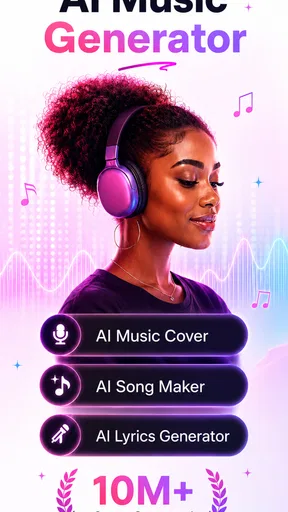
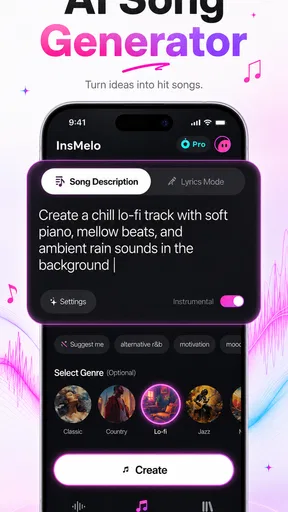
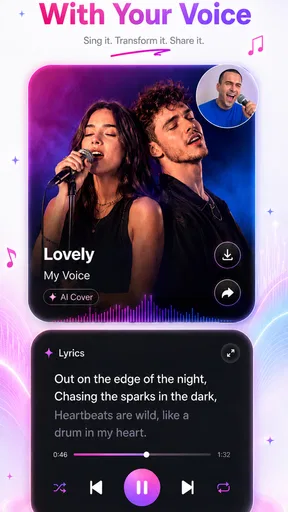
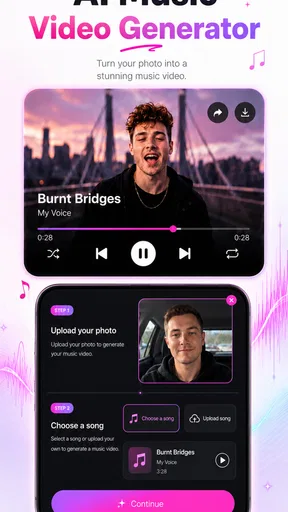
 Analysis by AppCompare
I tried AI Song & Cover Music・InsMelo as a quick way to turn an idea into an AI-made track, and my first impression was that it is aimed at people who want results before they want a complicated music workstation. It belongs to the Music & Audio category, comes from AI Mystic Labs, and is free to start. The appeal is easy to understand: you can experiment with song and cover concepts from a phone instead of opening a full desktop production setup.
That simplicity is also the key to judging it fairly. This is not the app I would choose when I need detailed mixing, precise vocal editing, or complete control over every instrument. I see it more as a creative sketchbook for AI music and short-form content. When the connection is reliable, it can make the distance between “I have an idea” and “I can hear a version of it” pleasantly short.
How the experience changes when the connection is doing the work
I find that the most useful way to approach an online AI music tool is to separate the idea from the moment of generation. I can shape a brief while offline, then use a reliable connection when I’m ready to hear what it becomes; that keeps a weak signal from turning creative work into guesswork. The next section looks at how that choice affects the handoff from a phone-made draft to whatever I want to do with it afterward.
The best moments happen when an idea becomes a file
The most important thing to understand is that an AI music app is not like a basic offline recorder. The interesting part of the process depends on sending a request away, waiting for processing, and receiving an audio result. That makes connectivity part of the creative experience rather than a background technical detail.
On a stable home connection, the workflow feels straightforward. I can think about a theme, try a song direction, and judge the result without preparing a full project. The waiting time becomes part of the process: instead of constantly adjusting a timeline, I listen, decide what feels wrong, and prepare a more focused next attempt.
This works particularly well for early-stage ideas. If I am writing a playful message for a friend, imagining a dramatic intro for a video, or testing whether a lyric concept has enough personality, I do not necessarily need studio-level control. I need a fast way to hear the mood. The app is strongest as an idea accelerator, not as a replacement for a complete production suite.
A weak or changing connection alters that feeling immediately. A request may take longer to complete, and the uncertainty can make experimentation less enjoyable. With a conventional music player, poor connectivity might affect streaming. With an AI creator, it can interrupt the actual generation process, so the network affects both waiting and momentum.
Worth Reading Before You Choose

Flipboard Shows What News Apps Must Do Beyond the Feed

Switching to Android Auto Means Rethinking Your Driving Routine

Google Calendar Makes a Crowded Week Easier to Manage

Ludo King Makes the Most of the Minutes Between Plans

Baby Panda World Brings Quick Play to Modern Phones, but Its Game Library Feels Busy

ESPN’s Live Game View Makes Following Close Games Easier
Why mobile data deserves more thought than the free label suggests
The app is free to install and use as an entry point, but that should not be confused with unlimited, cost-free experimentation in every sense. Its in-app purchases range from $3.99 to $199.99 per item, so I would treat repeated generation as something to approach deliberately rather than tapping through every possible variation without checking what an action may involve.
I would begin on Wi-Fi, especially when exploring several ideas in one sitting. That is not just about saving mobile data. A stable connection also makes it easier to tell whether a slow result comes from the service or from a temporary signal problem. If I were outside, I would prepare the concept first in notes, then open the app when I had a dependable connection instead of improvising while a mobile signal was fluctuating.
A useful habit is to make each attempt answer one question. Do I want a brighter mood? A slower feel? A different vocal character? Changing everything at once makes a result difficult to evaluate and can encourage unnecessary retries. The more specific the creative decision, the less likely I am to burn time and connectivity on random variations.
A realistic phone scenario
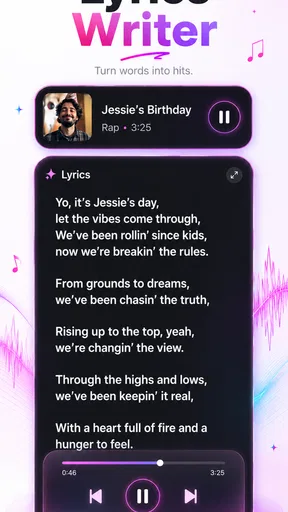
Imagine I am on a train and want a short musical birthday greeting for a friend. I can write the message while travelling, decide whether it should feel funny or sentimental, and wait until the connection is steady before attempting the creation. If the first result is close but too serious, I can refine the direction rather than starting from a completely different idea.
That scenario shows where the app fits naturally. It is convenient when the phone is the only creative device available and the goal is a shareable experiment rather than a polished commercial master. It is less suitable if I need to work continuously through a tunnel, on a flight, or in an area where the connection repeatedly disappears. In those situations, a local recorder or a conventional audio editor is the safer companion for capturing the idea.
What I do when a generation stalls
Network-dependent tools create a particular kind of frustration: the app may appear ready, but the result is not immediately available. My first response is not to press the same action repeatedly. Repeated taps can make it harder to know whether the original request is still processing or whether I have created multiple attempts.
I prefer a simple recovery routine. I check whether other internet-dependent apps are responding, wait briefly, and then return to the project rather than abandoning the idea immediately. If the connection is clearly unstable, I save the creative direction outside the app in plain language: the subject, emotional tone, and the change I want from the next attempt. That way, a failed session does not erase the thought behind it.
Another practical safeguard is to listen carefully before deciding that a result needs to be regenerated. Sometimes the first impression is shaped by surprise rather than quality. I may notice one odd vocal choice and overlook that the overall mood is useful. A short pause helps me distinguish a genuinely unsuitable result from one that only needs a narrower follow-up instruction.
Recovery is also easier when I avoid treating every output as final. I think of each generated version as a draft. That mindset reduces the temptation to keep restarting after a network interruption, because I am not expecting one attempt to solve the entire song. The app becomes more enjoyable when I use it to explore a direction and then choose the most promising version.
Mobile use is convenient, but the small screen changes the job
On a phone, the advantage is immediacy. I can work during a spare moment without opening a computer, and the compact format suits quick concepts, social clips, personal greetings, and playful cover experiments. The phone also keeps the process close to the moment of inspiration. If an idea arrives while I am away from my desk, I am more likely to try it instead of postponing it.
The trade-off is concentration. A small screen encourages quick decisions, but music often benefits from repeated listening and comparison. I would not judge a result only through a noisy street speaker or while multitasking. Headphones are more useful when I am checking whether the voice, arrangement, and overall mood match what I intended.
There is also a difference between making something on a phone and finishing something on a computer. A mobile AI generator can be the first stage of a workflow, while a desktop audio editor may be better for trimming, balancing, arranging, or combining the result with other material. If your goal is a carefully edited release, I would see InsMelo as a starting point rather than the entire studio.
That distinction matters for creators who already use traditional alternatives. A voice recorder gives direct control and predictable capture. A loop-based music app offers more hands-on arrangement. A full digital audio workstation provides deeper editing and mixing. InsMelo has a different advantage: it reduces the amount of technical preparation needed to hear a complete-sounding concept. The right choice depends on whether speed or control matters more for the task in front of you.
Cover experiments require a thoughtful workflow
The cover side is likely to attract people who want to explore familiar musical ideas through an AI treatment. I would approach that creatively rather than expecting a perfect substitute for a human performance. The interesting question is not only whether the output resembles the starting idea, but whether the new interpretation gives me a useful mood, character, or joke.
A good workflow is to begin with a clear purpose. Am I making something for private experimentation, a message, a short video, or a public post? The answer affects how much cleanup and checking I should do afterward. A quick personal experiment can tolerate an unusual result. Something intended for an audience deserves a more careful listen and a more cautious approach to rights and permissions.
I would also avoid judging the app solely by whether it reproduces a mental reference exactly. AI-generated music can be most useful when it suggests a direction I had not considered. If I demand precise artistic control from every attempt, I may find the process frustrating. If I use the output as a source of ideas, the unexpected parts can become valuable.
Who will enjoy it, and who should choose something else?
I think it suits curious listeners, short-form creators, casual songwriters, and people who want to test musical concepts without learning a large production environment first. It is especially appealing when the goal is speed: a rough concept, a playful cover-style experiment, or a sound idea to discuss with someone else.
I would be more cautious about recommending it to a musician who needs exact note editing, multitrack control, detailed vocal comping, or dependable work during long offline periods. Those users will probably feel more comfortable with a conventional audio workstation or a specialized recording application. The AI approach saves effort in one area while giving up some direct control in another.
It is also not the best fit for someone who dislikes iterative tools. The first output may not match the imagined result, and improvement usually comes from changing the brief and trying again. If you want a single tap to produce a finished track every time, the creative process may feel less predictable than the short description suggests.
Keeping the experience data-conscious
I would use the app in planned sessions rather than leaving it open while casually repeating generations. Before starting, I would decide what the song needs to communicate and write a compact brief. That small preparation makes each connected attempt more purposeful and helps avoid wasting mobile bandwidth on vague prompts.
For travel, I would separate preparation from generation. Draft lyrics, themes, and alternate moods can be written without relying on the app at that moment. Once I have a reliable connection, I can turn those notes into focused attempts. This approach also protects the creative idea when a train enters a dead zone or a public network becomes unreliable.
I would keep a simple record of the versions I actually like, using descriptive names outside the generation process when possible. “Warm birthday idea” is more useful than a sequence of indistinguishable drafts. It makes later comparison easier and reduces the urge to recreate a result simply because I cannot remember which attempt had the right feeling.
Privacy and ownership also deserve ordinary common sense. I would avoid submitting material I do not have permission to use, particularly when experimenting with recognizable songs or someone else’s voice. The app’s creative convenience does not remove the responsibility to think about what is being transformed and where the finished result will be shared.
Version, audience, and value
The app is marked for Everyone, which makes it approachable for a broad audience, but an age label does not mean every creative use is automatically appropriate for every context. Parents and younger users should still understand that AI-generated audio can be shared, reused, or interpreted differently once it leaves the phone.
The current version is 1.4.003, and the minimum operating system is Android 7.0. That makes it accessible to many older Android devices, though the practical experience will still depend on the phone’s performance, available storage, headphones, and connection quality. A compatible operating system is only the starting point for a comfortable music workflow.
Its average rating is 4.3 from around 5.3 thousand ratings, with 121 written reviews, and it has passed 100 thousand installs. Those figures suggest that the concept has found an interested audience, but they do not remove the need to decide whether AI experimentation matches your own expectations. I would read the positive reception as encouragement to try it, not as proof that it replaces every other music tool.
My connectivity verdict
After looking at the app through the lens of everyday mobile use, I see a clear strength: it makes AI song and cover experimentation feel close at hand when the network cooperates. It is a good companion for quick creative sessions, especially when I want to explore a mood or turn a rough idea into something audible without opening a full studio setup.
Its main limitation is equally clear. The experience is less dependable when connectivity is poor, and the free starting point should be approached with awareness of the available in-app purchases. I would use Wi-Fi for exploratory sessions, prepare ideas before travelling, and treat each result as a draft rather than a guaranteed finished production.
My recommendation is to try AI Song & Cover Music・InsMelo if you value fast musical experimentation more than detailed manual control. For a phone-based creative sketchpad, it has a sensible role. For offline recording, serious mixing, or exact artistic editing, I would choose a traditional audio tool instead and use this app only when its AI-first approach offers something genuinely useful.
Pros
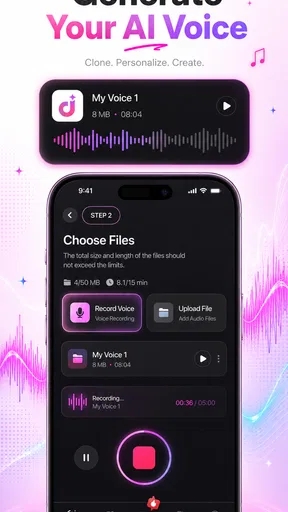
- Creates song covers quickly from a simple voice recording.
- Offers a broad selection of AI-generated vocal styles and effects.
- Useful for experimenting with melodies without advanced music skills.
- Lets users preview results before saving or sharing them.
- The interface is easy to understand for first-time creators.
Cons
- Output quality can vary noticeably between songs and vocal styles.
- Some features or song options may require a paid subscription.
- Processing times can increase when servers are busy.
- AI covers may sound less natural with unclear or off-key vocals.
- Sharing and exporting options may be limited in the free version.
FAQs for AI Song & Cover Music・InsMelo
What is AI Song & Cover Music・InsMelo?
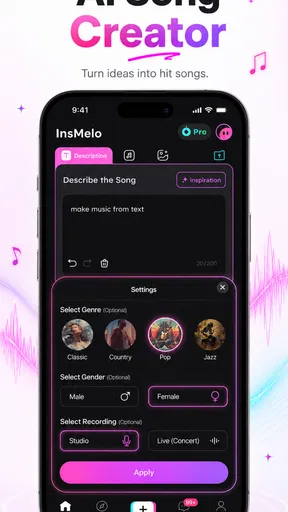
AI Song & Cover Music・InsMelo is an entertainment and music-creation app designed for users who want to experiment with artificial intelligence, song generation, and vocal covers. It typically lets you explore AI-produced music, transform vocal performances, or create cover-style content using available tools. The exact features may vary by version, region, device, and subscription plan, so checking the current app listing is recommended before downloading.
Can I create an AI song or cover without professional music experience?
Yes, the app is aimed at casual users as well as music enthusiasts, so advanced musical knowledge is generally not required. Depending on the available tools, you may be able to choose a song, style, voice, or other settings and let the app process the result. However, the quality of the final audio can depend on your input, the selected options, processing time, and whether the feature is available in your location.
Is AI Song & Cover Music・InsMelo free to use?
The app may be available to download for free, but some creation tools, voices, songs, exports, or higher-quality results can require in-app purchases or a subscription. Before starting a trial, carefully review its price, renewal terms, and cancellation instructions in the Google Play Store or Apple App Store. Free access may also include advertisements, usage limits, or restrictions on downloaded content.
Can I share or use the songs and covers created with InsMelo?
You may be able to save or share creations through supported options such as messaging apps, social networks, or your device’s storage. Nevertheless, sharing does not automatically give you commercial rights. Original songs, lyrics, melodies, recordings, and recognizable artist voices may be protected by copyright, publicity, or platform rules. Review InsMelo’s license terms and obtain permission when necessary before publishing or monetizing generated content.
What permissions and privacy considerations should I know about?
Because music and cover features may require audio files, recordings, microphone access, or media-library access, the app can request permissions related to your device’s microphone and storage. Grant only the access needed for the feature you intend to use, and review the developer’s privacy policy to understand how recordings, account information, prompts, and generated content are handled. Avoid uploading private or sensitive recordings unless you are comfortable with the stated data practices.


